
Tesla 2026.38.5.6
Update rollout
Figures cover vehicles tracked by Teslascope.
- Recorded installs
- 150
- Awaiting update
- 4
- Last observed
Installs by model and country
| Model Y · AI4 | 94 |
|---|---|
| Model 3 · AI4 | 56 |
| Australia | 142 |
|---|---|
| New Zealand | 8 |
What’s in this update
-
Arrival and parking options
Choose where the car should stop at the end of a trip, such as a parking lot, a street space or a driveway. FSD remembers the choice for that destination.
Models in the notes Model Y & Model 3
Autopilot hardware AI4
Countries in the notes Australia & New Zealand

-
Brake confirmation
This setting controls whether the driver confirms FSD start with the brake pedal. The driver must continue supervising the system.
Models in the notes Model Y & Model 3
Autopilot hardware AI4
Countries in the notes Australia & New Zealand

-
FSD 14.3.12 for Australia and New Zealand
The notes for this regional build describe refinements to parking and recognition of difficult road situations. FSD remains supervised throughout the trip.
Models in the notes Model Y & Model 3
Autopilot hardware AI4
Countries in the notes Australia & New Zealand

-
Security improvements
Tesla lists security fixes for the vehicle software. The release notes give no details about the specific vulnerabilities addressed.
Models in the notes Model Y & Model 3
Autopilot hardware AI4
Countries in the notes Australia & New Zealand

-
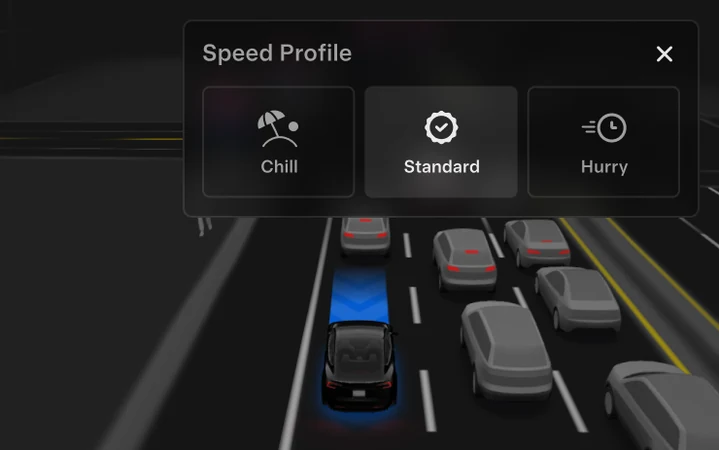
FSD speed profiles
FSD uses the chosen driving style alongside the speed limit and surrounding traffic. On branches that include Sloth, it is a more conservative option than Chill.
Models in the notes Model Y & Model 3
Autopilot hardware AI4
Countries in the notes Australia & New Zealand

-
FSD controls on the centre display
The driving view puts the speed profile and arrival settings within reach, alongside the live view of the road.
Models in the notes Model Y & Model 3
Autopilot hardware AI4
Countries in the notes Australia & New Zealand

Availability varies by vehicle configuration and region. Check Controls → Software on your Tesla to see what’s available for your car.
Updates stopped and your Tesla is offline?
Record the installed version and any update message. Note whether the Tesla app can reach the car over Wi-Fi. Share these details in your request so TSLA can assess whether remote certificate recovery applies.
Check certificate recovery options